Product Center
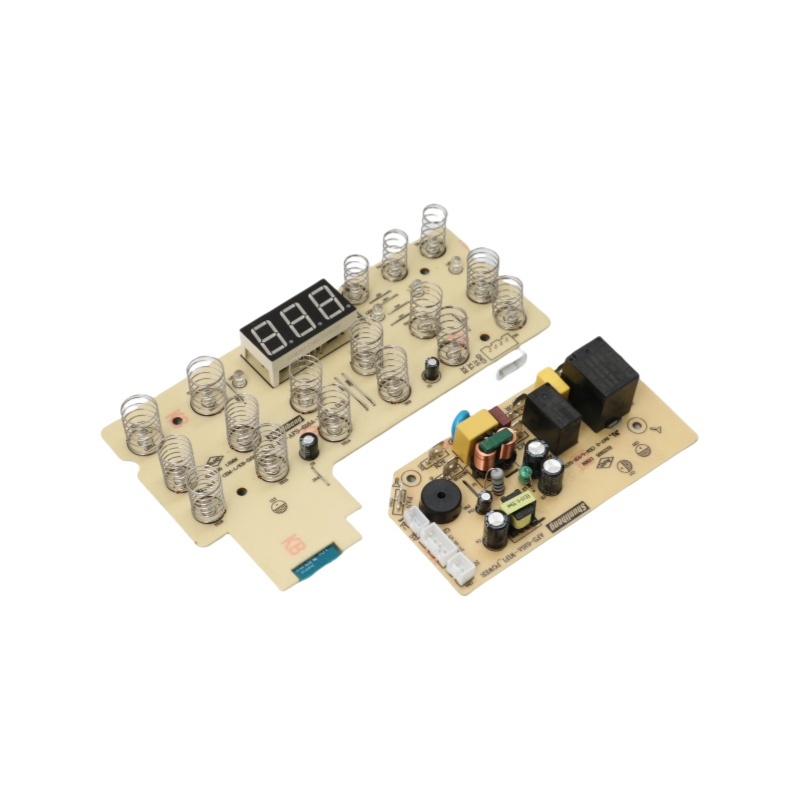
Air fryer control panel
The company focuses on the R&D, production, and sales of home appliance hardware and software, covering kitchen appliances, smart home, home textile controllers, etc. It also focuses on WIFI/Bluetooth, 5G/6G module applications, empowering smart life with innovative technologies.
Category:
Product Description
# Air Fryer Control Panel
In recent years, air fryers have gained immense popularity as a versatile kitchen appliance that allows users to enjoy crispy and delicious meals with less oil. One of the most critical components of an air fryer is its control panel. Understanding the functionality and features of the air fryer control panel is essential for maximizing the appliance's capabilities and ensuring optimal cooking results. In this article, we will explore the various elements of an air fryer control panel, how to use them effectively, and tips for getting the most out of your air fryer.
## Overview of the Control Panel
The control panel of an air fryer is the interface that allows users to operate the appliance. It typically consists of buttons, dials, or a touchscreen, depending on the model. The control panel provides access to various settings, including temperature, cooking time, and cooking modes. Most air fryers are designed with user-friendliness in mind, making it easy for anyone to navigate through the options available.
## Key Features of the Control Panel
### Temperature Control
One of the primary functions of the air fryer control panel is to set the cooking temperature. Most air fryers allow users to adjust the temperature anywhere between 180°F and 400°F. The temperature control is crucial because different foods require different cooking temperatures to achieve the desired texture and flavor. For example, frozen french fries may need a temperature of around 400°F for a crispy finish, while chicken breasts may require a lower temperature to ensure even cooking without drying out.
### Cooking Time
In addition to temperature control, the air fryer control panel allows users to set the cooking time. This feature is essential for preventing overcooking or undercooking food. Most air fryers come with a timer that can range from 1 to 60 minutes. Users should always refer to the cooking guidelines for specific foods to determine the appropriate cooking time. Many air fryers also have a pause function that allows users to check on their food without resetting the timer.
### Cooking Modes
Many modern air fryers come equipped with multiple cooking modes, which can be easily accessed through the control panel. These modes may include options such as frying, baking, roasting, grilling, and even dehydrating. Each mode is optimized for different types of food and cooking techniques, allowing users to experiment with various recipes. For example, the baking mode may have a different temperature and time setting than the frying mode, making it easier to achieve the best results for each type of dish.
### Preset Programs
To make cooking even more convenient, some air fryers feature preset programs for popular dishes. These presets are pre-programmed settings that automatically adjust the temperature and cooking time based on the selected food item. Common presets may include options for chicken wings, fish, vegetables, and even desserts. Using these presets can save time and take the guesswork out of cooking, making it an excellent feature for beginners.
## User Experience and Navigation
### Touchscreen vs. Buttons
The design of the control panel can significantly impact the user experience. Touchscreen panels are becoming increasingly popular due to their sleek appearance and ease of use. Users can simply tap on the desired settings and navigate through the options with minimal effort. On the other hand, traditional button panels may provide tactile feedback, which some users prefer. Regardless of the design, the key is to choose an air fryer with a control panel that feels comfortable and intuitive to use.
### Display Readouts
Many air fryers feature a digital display that provides real-time information about the cooking process. This display may show the current temperature, remaining cooking time, and even the selected cooking mode. Having this information readily available helps users monitor their food without having to open the air fryer, which can disrupt the cooking process. Some advanced models even come with smart features that allow users to control the air fryer remotely through a mobile app.
## Tips for Effective Use of the Control Panel
### Familiarize Yourself with the Settings
Before using your air fryer for the first time, it’s essential to familiarize yourself with the control panel and its settings. Take a few minutes to read the user manual and understand the functions of each button or option. Knowing how to navigate the control panel will help you feel more confident when cooking.
### Experiment with Temperature and Time
While preset programs are convenient, it’s also beneficial to experiment with temperature and cooking time. Different brands and models of air fryers may have slight variations in cooking performance. Keep track of your adjustments and note which settings yield the best results for your favorite recipes.
### Use the Pause Function
If your air fryer has a pause function, don’t hesitate to use it. This feature allows you to check on your food without losing valuable cooking time. It’s particularly useful when cooking larger items, such as whole chickens or roasts, to ensure they are cooking evenly.
## Conclusion
The control panel of an air fryer is a vital component that significantly influences the cooking experience. By understanding its features, such as temperature control, cooking time, cooking modes, and preset programs, users can make the most of their air fryers. Whether you are a novice cook or an experienced chef, mastering the control panel will empower you to create a variety of delicious meals with ease. So, take the time to explore your air fryer’s control panel, and enjoy the many culinary possibilities it offers.
# Air Fryer Control Panel
In recent years, air fryers have gained immense popularity as a versatile kitchen appliance that allows users to enjoy crispy and delicious meals with less oil. One of the most critical components of an air fryer is its control panel. Understanding the functionality and features of the air fryer control panel is essential for maximizing the appliance's capabilities and ensuring optimal cooking results. In this article, we will explore the various elements of an air fryer control panel, how to use them effectively, and tips for getting the most out of your air fryer.
## Overview of the Control Panel
The control panel of an air fryer is the interface that allows users to operate the appliance. It typically consists of buttons, dials, or a touchscreen, depending on the model. The control panel provides access to various settings, including temperature, cooking time, and cooking modes. Most air fryers are designed with user-friendliness in mind, making it easy for anyone to navigate through the options available.
## Key Features of the Control Panel
### Temperature Control
One of the primary functions of the air fryer control panel is to set the cooking temperature. Most air fryers allow users to adjust the temperature anywhere between 180°F and 400°F. The temperature control is crucial because different foods require different cooking temperatures to achieve the desired texture and flavor. For example, frozen french fries may need a temperature of around 400°F for a crispy finish, while chicken breasts may require a lower temperature to ensure even cooking without drying out.
### Cooking Time
In addition to temperature control, the air fryer control panel allows users to set the cooking time. This feature is essential for preventing overcooking or undercooking food. Most air fryers come with a timer that can range from 1 to 60 minutes. Users should always refer to the cooking guidelines for specific foods to determine the appropriate cooking time. Many air fryers also have a pause function that allows users to check on their food without resetting the timer.
### Cooking Modes
Many modern air fryers come equipped with multiple cooking modes, which can be easily accessed through the control panel. These modes may include options such as frying, baking, roasting, grilling, and even dehydrating. Each mode is optimized for different types of food and cooking techniques, allowing users to experiment with various recipes. For example, the baking mode may have a different temperature and time setting than the frying mode, making it easier to achieve the best results for each type of dish.
### Preset Programs
To make cooking even more convenient, some air fryers feature preset programs for popular dishes. These presets are pre-programmed settings that automatically adjust the temperature and cooking time based on the selected food item. Common presets may include options for chicken wings, fish, vegetables, and even desserts. Using these presets can save time and take the guesswork out of cooking, making it an excellent feature for beginners.
## User Experience and Navigation
### Touchscreen vs. Buttons
The design of the control panel can significantly impact the user experience. Touchscreen panels are becoming increasingly popular due to their sleek appearance and ease of use. Users can simply tap on the desired settings and navigate through the options with minimal effort. On the other hand, traditional button panels may provide tactile feedback, which some users prefer. Regardless of the design, the key is to choose an air fryer with a control panel that feels comfortable and intuitive to use.
### Display Readouts
Many air fryers feature a digital display that provides real-time information about the cooking process. This display may show the current temperature, remaining cooking time, and even the selected cooking mode. Having this information readily available helps users monitor their food without having to open the air fryer, which can disrupt the cooking process. Some advanced models even come with smart features that allow users to control the air fryer remotely through a mobile app.
## Tips for Effective Use of the Control Panel
### Familiarize Yourself with the Settings
Before using your air fryer for the first time, it’s essential to familiarize yourself with the control panel and its settings. Take a few minutes to read the user manual and understand the functions of each button or option. Knowing how to navigate the control panel will help you feel more confident when cooking.
### Experiment with Temperature and Time
While preset programs are convenient, it’s also beneficial to experiment with temperature and cooking time. Different brands and models of air fryers may have slight variations in cooking performance. Keep track of your adjustments and note which settings yield the best results for your favorite recipes.
### Use the Pause Function
If your air fryer has a pause function, don’t hesitate to use it. This feature allows you to check on your food without losing valuable cooking time. It’s particularly useful when cooking larger items, such as whole chickens or roasts, to ensure they are cooking evenly.
## Conclusion
The control panel of an air fryer is a vital component that significantly influences the cooking experience. By understanding its features, such as temperature control, cooking time, cooking modes, and preset programs, users can make the most of their air fryers. Whether you are a novice cook or an experienced chef, mastering the control panel will empower you to create a variety of delicious meals with ease. So, take the time to explore your air fryer’s control panel, and enjoy the many culinary possibilities it offers.
Keywords:
Air fryer


Ningbo Shunliheng Electronics Co., Ltd.
Address: No. 65, Haichao Road, Zhongyi Ningbo Eco-Park, Yuyao City, Zhejiang Province